NOTE: If you own two (2) or more awnings that only operate on a single (1) channel remote, you will need to disconnect power from the products you are not resetting and programming.
To pair the motor to a new controller:
- Start with the shade connected to power.
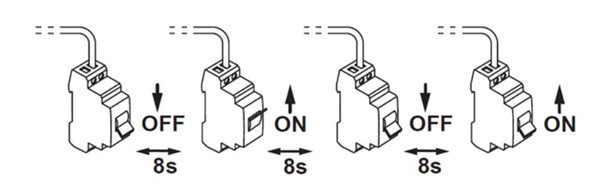
- Perform a Dual Power Cut by disconnecting the awning for eight (8) seconds, connecting it back to power for eight (8) seconds, disconnecting it again for another eight (8) seconds, then connecting it back to power one final time. The awning will start to move on its own. Let the awning finish moving before proceeding to the next step.
- With the remote that you wish to control the awning, select the channel, if applicable, using the button at the bottom of the remote until the correct channel light is flashing.
- Using a small item, like a paperclip, hold the programming button located on the controller for eight (8) seconds; the awning will jog (short up/down motion).
- The motor is now paired with your controller. Repeat each for each awning as necessary.
For additional support:
- Email: motorization.support@springswindowfashions.com, responses could take up to 2 business days
- Customer Service Team: 1-800-221-6352
Was this article helpful?
That’s Great!
Thank you for your feedback
Sorry! We couldn't be helpful
Thank you for your feedback
Feedback sent
We appreciate your effort and will try to fix the article