Follow the below steps for resetting your WiFi network on your Bond Bridge or Bridge Pro
- Using a small thin object such as a paper clip or toothpick, press and hold the reset switch (small hole located near the USB cable) until the ring turns green. This will take about 5 seconds. Note: It is important to release prior to 8 seconds, holding for 8 seconds or longer will factory reset the Bridge.
Bridge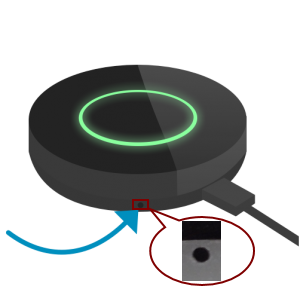
Bridge Pro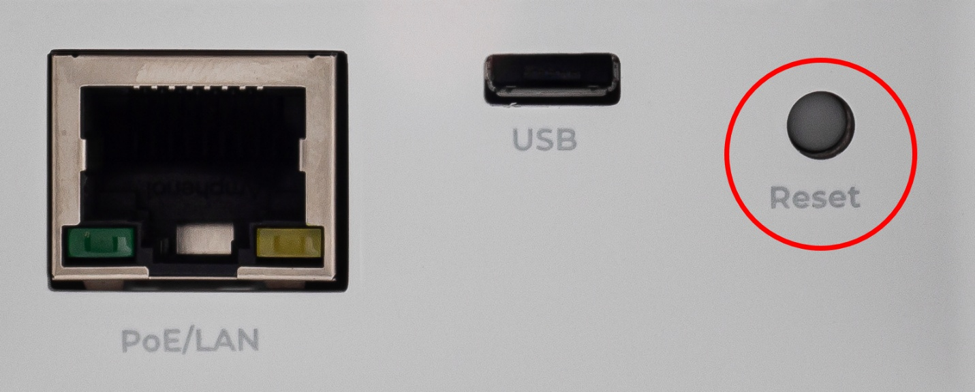
- The ring will blink white for several seconds and then return to flashing green.
- Open the Bond Home application and select the + sign to add a new Bond. None of your current device settings will be changed or removed.
- If your Bond device has a QR code on the bottom, select SCAN QR CODE. If not, select Bridge.
- If your Bond device has a QR code on the bottom, select SCAN QR CODE. If not, select Bridge.
- The Bond Home app will guide you through the process of connecting to a new WiFi network.
For additional Bond Bridge/Bridge Pro technical support:
- Chat with us through the Help Center in the Bond Home app
- Email: customerservice@olibra.io
For all other support for your motorized shades and awnings:
- Email: motorization.support@springswindowfashions.com, responses may take up to 2 business days
- Customer Service Team: 1-800-221-6352
Was this article helpful?
That’s Great!
Thank you for your feedback
Sorry! We couldn't be helpful
Thank you for your feedback
Feedback sent
We appreciate your effort and will try to fix the article