If your shade is traveling the wrong way when controlling it (Open is close, close is open) but your stopping points are correct, you may just need to reverse the control direction of your shade:
Open the Motorization app. Within the “Shades” tab, if the app starts in “room view,” tap on the existing room the shade is assigned to. Locate the individual shade that needs to be adjusted and tap the settings (gear) icon for this shade.
Alternatively, search for the shade by name by tapping the magnifying glass in the top right corner of the “Shades” screen.
Tap “Roll Direction.”
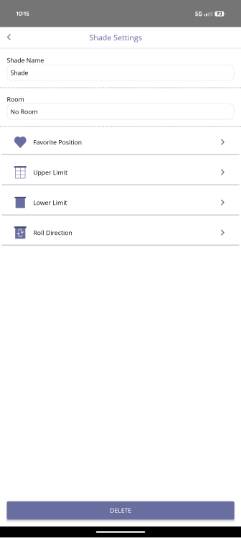
Tap “Confirm.” The LED on the motor should begin alternating green and red.
Tap “Confirm” again; the shade should do a brief down/up jog, and the app will take you back to the settings screen. Exit out of settings and operate the shade; control direction should now be correct.
If controls do not reverse following the above steps, disconnect the shade from power for at least 30 seconds before reconnecting it. After the shade has been reconnected to power, try steps 1-4 again.
For additional support:
Email: motorization.support@springswindowfashions.com, responses could take up to 24 hours
Customer Service Team: 1-800-221-6352
Was this article helpful?
That’s Great!
Thank you for your feedback
Sorry! We couldn't be helpful
Thank you for your feedback
Feedback sent
We appreciate your effort and will try to fix the article