NOTE: If you own two (2) or more shades that only operate as a group, you will need to disconnect power from the shades you are not programming.
Setting the Favorite, Home, or Middle position:
- Using the controller that currently controls the shade, select the channel, if applicable.
- Move the shade using the UP or DOWN arrows. When the shade is in the new favorite position, quickly press and release the STOP button.
- Quickly PRESS and RELEASE the Programming button on the controller. The shade will jog (short up/down motion) and beep once.
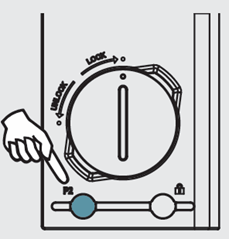
- Quickly PRESS and RELEASE the STOP button on the controller. The shade will jog (short up/down motion) and beep once.
- Quickly PRESS and RELEASE the STOP button on the controller. The shade will jog and beep two (2) times.
- Repeat for each shade as necessary.
Smart Home Collection - Setting a Favorite Position
For additional support:
- Email: motorization.support@springswindowfashions.com, responses could take up to 2 business days
- Customer Service Team: 1-800-221-6352
Was this article helpful?
That’s Great!
Thank you for your feedback
Sorry! We couldn't be helpful
Thank you for your feedback
Feedback sent
We appreciate your effort and will try to fix the article