Shades in a Cassette Valance:
- Remove shade from mounting brackets by firmly pushing in on cassette valance and rotating down to release it.
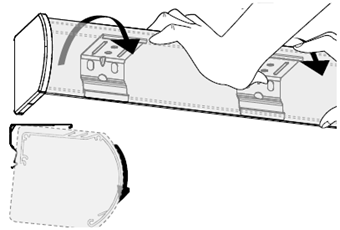
- Remove the plastic endcap from the motor side of the cassette, exposing the metal endplate with screws.
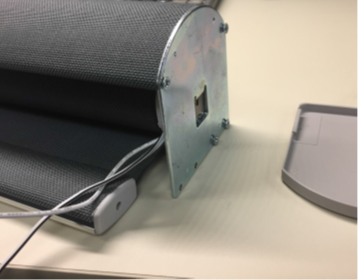
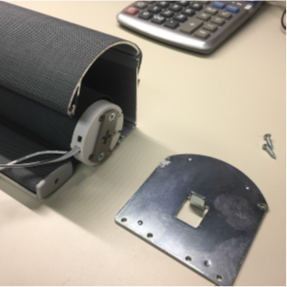
- Remove the four (4) screws on the endplate to uninstall the endplate from the cassette.
Shades not in a cassette valance:
Push up on the motor end and push the shade to the non-motor side until the hooks on the motor clear the installation bracket. Then swing the shade up and out.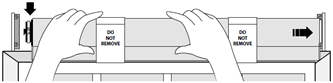
Replacing the motor:
- Pull the motor out of the shade.
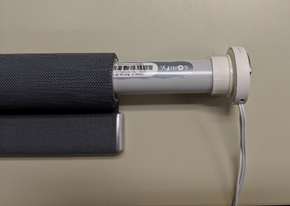
- If the replacement motor was not sent with a new crown and drive adapter (see picture below), then you will need to remove them from the old motor.
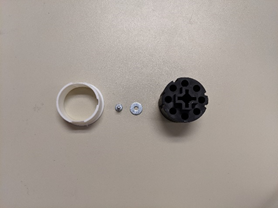
- Install the crown on the motor in the pictured position.
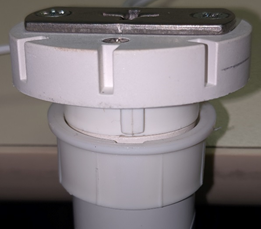
- Install the drive adapter, washer, then screw to the motor.
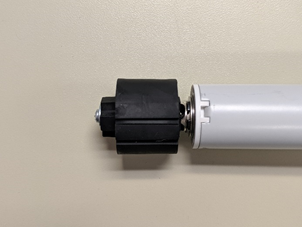
- When inserting the new motor back into the shade, align the grooves on the drive adapter with the notches in the tube.
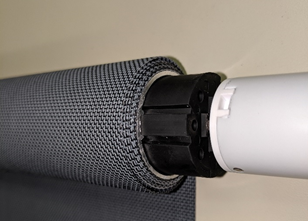
- Slide the motor fully into the tube. Make sure the crown is also aligned with the notches in the tube.
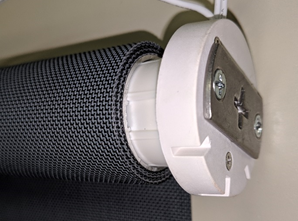
- Attach the endplate into the motor and fasten the endplate to the cassette with the four screws removed earlier.
NOTE: Skip this step if you do not have a cassette.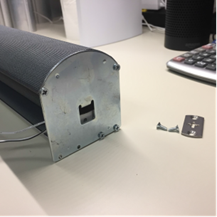
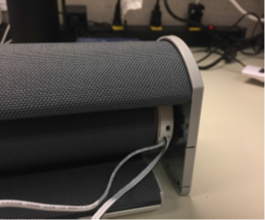
- Install the shade back into its mounting brackets.
- Follow the link here to program your new motor to your controller.
For additional support:
Email: motorization.support@springswindowfashions.com, responses could take up to 24 hours
Customer Service Team: 1-800-221-6352
Was this article helpful?
That’s Great!
Thank you for your feedback
Sorry! We couldn't be helpful
Thank you for your feedback
Feedback sent
We appreciate your effort and will try to fix the article