Before you Start: The shade will jog (short up/down motion) when connected to the power source. If the shade jogs again in approximately 3-10 seconds, this means that your shade is paired to a remote.
If the shade does not jog two times when powered up- this confirms that the remote is not paired to the shade. Follow the steps under “How to reset the shade without a working remote” below.
If the shade does not jog, follow the link here to confirm power on the shade and then return to this article to finish programming.
With a working remote
- Press and hold the programming button on the controller for two(2) seconds, the shade will jog once.
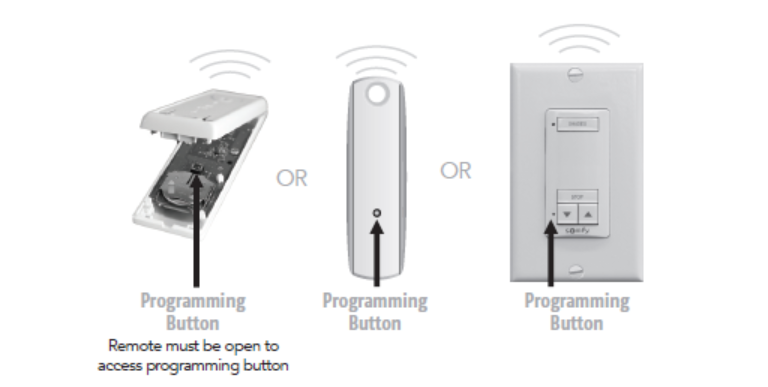
- Immediately after the shade jogs, press and hold the programming button on the controller again for seven (7) seconds, the shade will jog again. This will clear all remotes paired to the shade.
- If you want to also reset all limits back to factory settings, hold the programming button again immediately after step two for another seven (7) seconds, the shade will jog again. You will now need to set new limits following the steps linked here.(needs link)
Without a working remote
- Disconnect the power from the shade for at least two (2) minutes.
- Reconnect the power back to the shade, confirm the shade jogs.
- Immediately after the shade jogs, press and hold the programming button on the controller for seven (7) seconds, the shade will jog again. This will clear all remotes paired to the shade.
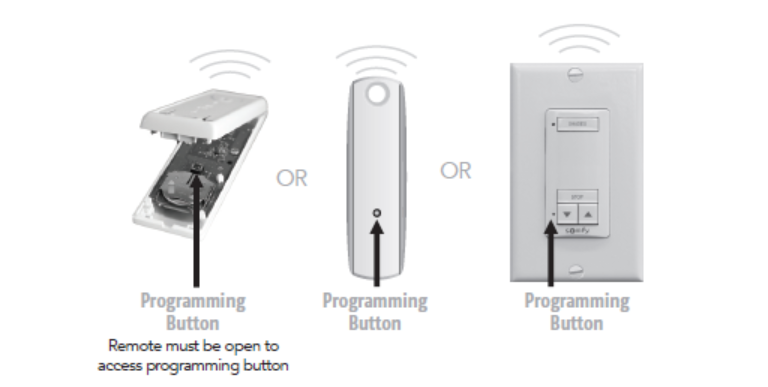
- If you want to also reset all limits back to factory settings, hold the programming button again immediately after step two for another seven (7) seconds, the shade will jog again. You will now need to set new limits following the steps linked here.(needs link)
For additional support:
Email: motorization.support@springswindowfashions.com, responses could take up to 24 hours
Customer Service Team: 1-800-221-6352
Was this article helpful?
That’s Great!
Thank you for your feedback
Sorry! We couldn't be helpful
Thank you for your feedback
Feedback sent
We appreciate your effort and will try to fix the article