To set curtain end limits for a Glydea Ultra motor with a Zigbee module and connect the motor to a remote without the pro app, please follow the instructions below:
- Before beginning, make sure the motor is in factory reset mode, meaning there are no limits or control paired.
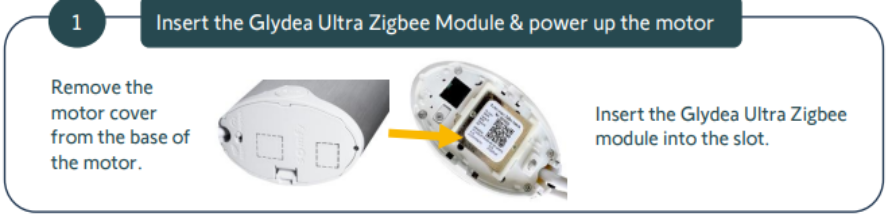
- Unplug the motor from power, then remove the motor cover from the base of the motor and insert the Glydea Ultra Zigbee module into the slot.
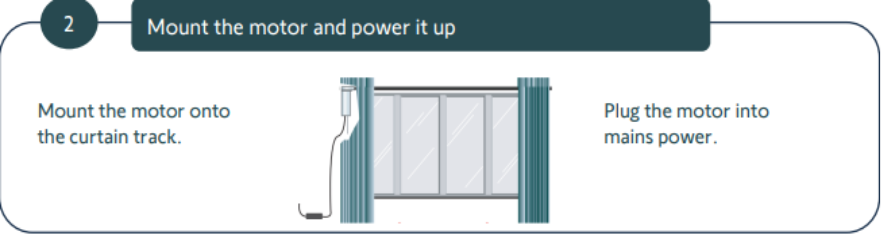
- Mount the motor to the track and plug the motor into power.
- Gently tug the curtain fabric to manually trigger the touch motion function. The motor will automatically begin to learn it’s end limits. Do not stop the motor until the end limits have been reached and the motor has completely stopped.
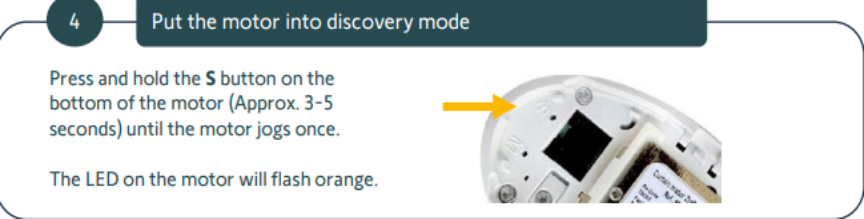
- Press and hold the “S” button on the bottom of the motor until the motor jogs once. The LED on the motor should begin flashing orange after the button has been released.
- Ensure the remote is within 60cm, or roughly 2 feet, of the motor head. Briefly tap (less than .5 seconds) the programming button on the back of the remote. The LED on the remote should begin flashing orange. It can take up to 30 seconds for the motor to respond. Do not touch or intervene with the equipment at this time.
- When the motor successfully pairs, the LED on the remote will flash green and the motor will jog once.
For additional support:
Email: motorization.support@springswindowfashions.com, responses could take up to 24 hours
Customer Service Team: 1-800-221-6352
Was this article helpful?
That’s Great!
Thank you for your feedback
Sorry! We couldn't be helpful
Thank you for your feedback
Feedback sent
We appreciate your effort and will try to fix the article