If you are going to be away from the shades for an extended period, turning your rechargeable motor “off” will help save its battery. For all non-rechargeable motors, simply disconnect the power source from the shade.
NOTE: These steps can only be performed if the shade works with a controller.
TURNING THE MOTOR “OFF”:
- Press and HOLD the motors program button until the shade jogs (short up/down motion) once.
NOTE: The motor will now have a blinking GREEN light.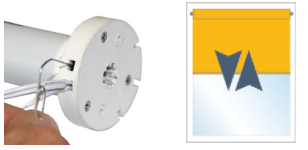
- Press and hold the UP, MY and DOWN (“STOP”) buttons together on the controller until the shade jogs once.
NOTE: The motor will no longer be blinking green. - Repeat for each shade as necessary.
The shades will no longer respond to any controllers or apps. When you are ready to operate the shades again, you will need to reactivate the motor (turn it back “on”).
TURNING THE MOTOR “ON”:
- Quickly press and release the motors program button once, the shade will jog once to confirm it is now “on”.
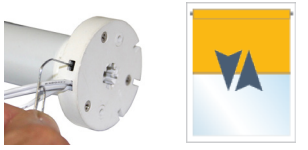
- Confirm the shade works as normal with your controller(s).
- Repeat for each shade as necessary.
For additional support:
- Email: motorization.support@springswindowfashions.com, responses could take up to 24 hours
- Customer Service Team: 1-800-221-6352
Was this article helpful?
That’s Great!
Thank you for your feedback
Sorry! We couldn't be helpful
Thank you for your feedback
Feedback sent
We appreciate your effort and will try to fix the article