If your shade does not operate, the most common cause is power issue. Always check that connections are firmly made and that you have batteries installed correctly (if applicable). One of the easiest ways to determine whether a shade is operational is to substitute the power from a known working shade (if possible). If you don't have a known working power source to substitute, check the following:
Check the battery in the controller(s):
- Does the remote light up when you press any button on the remote control for the shade?
- If there are no lights on the remote, you will need to replace the battery (CR2430) in the remote. You will need a screwdriver to open the back of the remote to replace the battery.
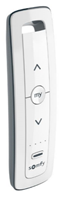
Check power to the shade motor:
To make sure your shade has power, quickly press and release the program button on the motor.
Reloadable Battery Tubes:
- Remove one end cap and remove the AA batteries, insert new AA Batteries.
Note: Be sure to follow the label on the battery tube that displays proper battery direction.
- Make sure both battery end caps are on straight and tight. You may need to remove both end caps to check proper assembly.
Note: Both caps are removable and if not fully screwed on, the tube will not work
- Ensure motor lead and battery lead connections are tight and secure.
Once the power is fixed, reconnect the battery tube to the shade and check shade operation.
Note: on larger shades there may be two battery packs instead of one. Repeat steps 1-3 for each battery pack.
Rechargeable Battery Pack:
Depending on the size and usage of the shade, the battery packs will need to be charged at least once a year. Simply locate your charger and plug it into the rechargeable battery pack until fully charged. This will take approximately 6 hours, and the chargers LED light will turn solid green to indicate the charging is complete.
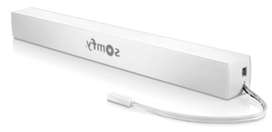
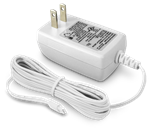
Solar Power Kit: - see PDF Attachment below.
Batteries can be charged with a NiHM charger purchased locally. (Note: the solar kit is no longer available)
Re-Pair the Shade and Remote:
See the steps here to pair the control and the shade.
For additional support:
- Email: motorization.support@springswindowfashions.com, responses could take up to 24 hours
- Customer Service Team: 1-800-221-6352
Was this article helpful?
That’s Great!
Thank you for your feedback
Sorry! We couldn't be helpful
Thank you for your feedback
Feedback sent
We appreciate your effort and will try to fix the article