Before you start: Identify which remote already controls the shade(s) and if you have a shade using a rechargeable motor(link).If multiple shades work on the same channel – or single channel remote – please disconnect power to all other shades. For a rechargeable motor you will need to put the motor to sleep via these instructions(link).
Follow these steps to copy a shade from one channel or remote to another.
- Start with the controller that currently operates the shade.
- Using a small item, like a paperclip, press and hold the programming button located on the back of the remote (see picture) until the shade does a short up/down movement called a jog.
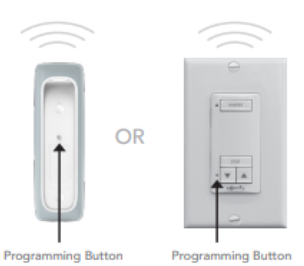
- Once the shade has jogged you will then need to switch over to the new remote/channel.
- Using a small item, like a paperclip, quickly tap the programming button on the back of the remote. The shade will do a quick jog on its own. NOTE: Do not hold the programming button.
- Confirm the shade now operates on the new remote/channel by using the up or down arrows on the front of the remote.
For additional support:
Email: motorization.support@springswindowfashions.com, responses could take up to 24 hours
Customer Service Team: 1-800-221-6352
Was this article helpful?
That’s Great!
Thank you for your feedback
Sorry! We couldn't be helpful
Thank you for your feedback
Feedback sent
We appreciate your effort and will try to fix the article